 Capital Thread HQ
Are your bids protecting your margin?
Contractor Job Costing Workbook
Build estimates with overhead and profit built in, then track every cost and change order while the job runs so you catch trouble early.
Made for: Small contractors, remodelers and trades who bid jobs.
What it does
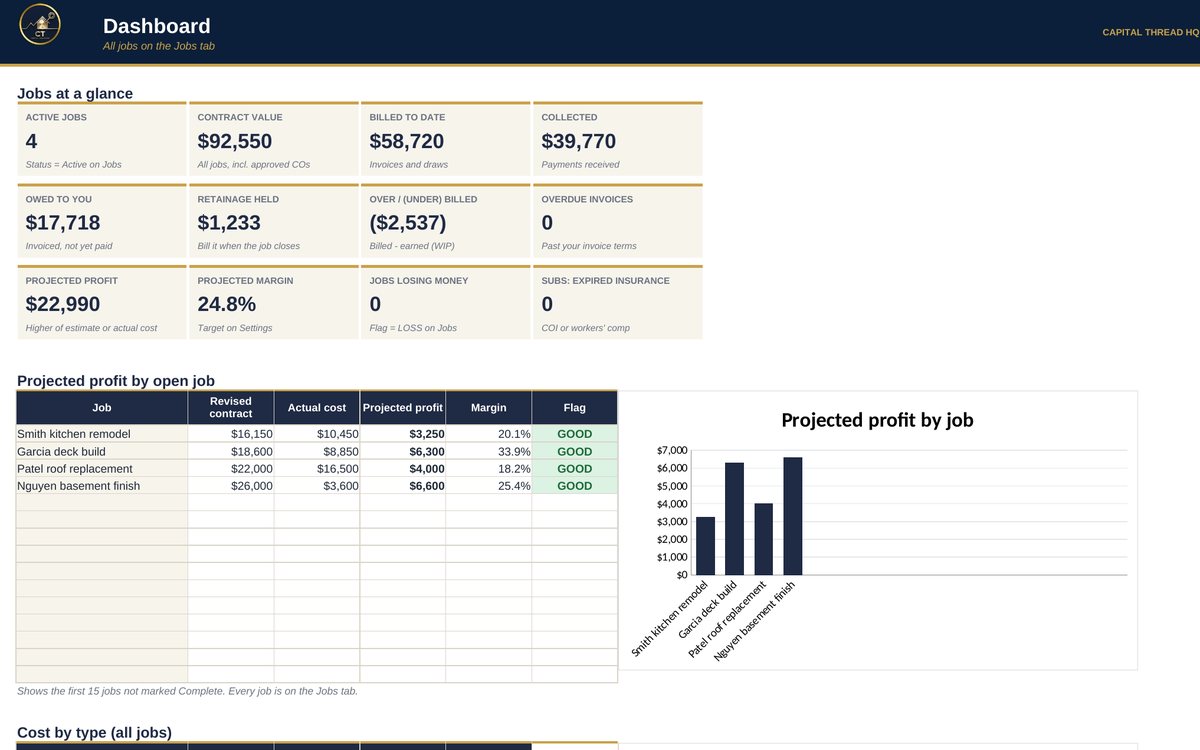
- Builds a bid from your costs, overhead and target margin, turns it into a client-ready proposal, then tracks actual costs and approved change orders against each job.
- Tracks every invoice and draw with retainage, shows who owes you and what's overdue, and keeps a work-in-progress (WIP) schedule of over/under billing.
- Keeps your subcontractor paperwork in check: W-9s, insurance and workers' comp expiry dates, and who needs a 1099.
Watch the walkthrough
Jay walks through every tab with example numbers, so you know exactly how to set it up.
What's inside
11 tabs, including a Start Here guide. Example rows show the format; type over them with your own numbers.
How to set it up
- Settings: your company name and contact (for the Proposal), overhead %, target margin, labor burden %, retainage and payment terms.
- Estimate: list labor, materials, subs, equipment and permits for a bid. The bid price and the budget by type appear on the right.
- Proposal: add the scope of work, then print or save as PDF for your client. Internal costs never show on it.
- Jobs: when you win, add the job with its contract price and the budget by type (copy it from the Estimate's 'Copy to Jobs' box).
- Costs, Change Orders and Billing: log costs (with labor hours), change orders and every invoice as they happen. Add the Date paid when the client pays.
- Subcontractors: list your subs and their insurance dates. Dashboard and Job Budget add everything up automatically.
Questions
Does it work in Google Sheets?
Yes. It is built in Excel and opens in Google Sheets: upload the file to Google Drive and choose Open with Google Sheets. Excel (desktop or Microsoft 365) gives the smoothest experience. Apple Numbers is not supported.
Do I need to know formulas?
No. Blue text on a yellow cell is something you type. Everything else calculates for you, and the Start Here tab explains each step.
How do I get the file?
Buy it on Etsy and download it instantly from your Etsy purchases. Nothing is shipped.
Is this tax or legal advice?
No. Tax figures are planning estimates to help you set money aside. Check with a tax professional for your situation.
Something else? Message us on Etsy or tap Ask Jay at the bottom of the page.