 Capital Thread HQ
How much sooner could you own your home?
Early Home Payoff Calculator
See how extra payments cut your payoff date and interest, when PMI can come off, a biweekly option, and a refinance check.
Made for: Homeowners thinking about paying extra on their mortgage.
What it does
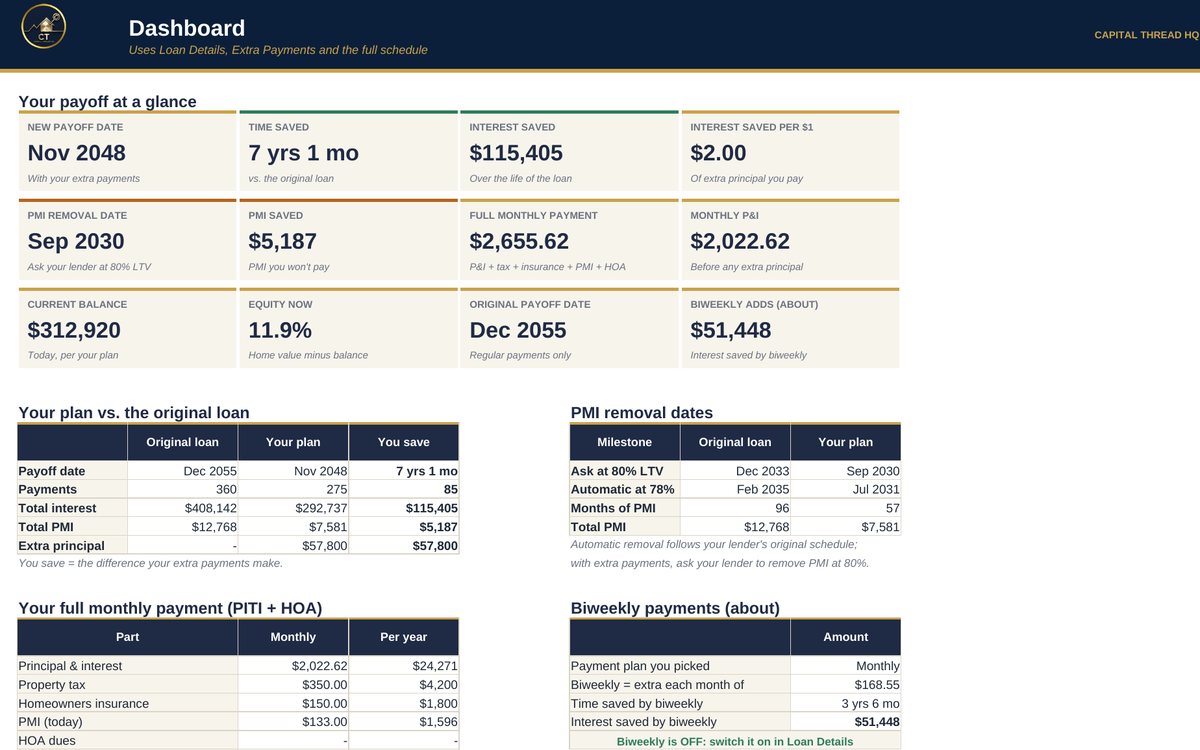
- Builds your mortgage schedule twice: once with only the regular payment and once with your extra principal. Shows the new payoff date, time saved and interest saved.
- Finds the month your PMI can come off (80% and 78% of the home's value) for both schedules, and how much PMI you save by paying early.
- Adds a biweekly option, an 'I already have a mortgage' mode, a log of your actual payments, a refinance check and an invest-vs-prepay estimate.
Watch the walkthrough
Jay walks through every tab with example numbers, so you know exactly how to set it up.
What's inside
9 tabs, including a Start Here guide. Example rows show the format; type over them with your own numbers.
How to set it up
- Loan Details: enter the loan amount, rate, term, first payment date and any extra principal you add every month. Pick Monthly or Biweekly.
- Already paying this loan for a while? Also enter your Current balance and its As of date (from your statement). The plan then starts from today's balance.
- Loan Details, lower part: home value at purchase, monthly PMI, property tax, insurance and HOA, for PMI dates and your full monthly payment.
- Extra Payments: log one-time extra principal (tax refund, bonus, gift) with the date paid. It is applied in that month.
- Actual Payments: each month, log what you paid and how much of it was extra principal. Add your statement balance now and then to check you're on track.
- Dashboard: everything updates. Use What-If, Refinance Check and Invest vs Prepay to test ideas.
Questions
Does it work in Google Sheets?
Yes. It is built in Excel and opens in Google Sheets: upload the file to Google Drive and choose Open with Google Sheets. Excel (desktop or Microsoft 365) gives the smoothest experience. Apple Numbers is not supported.
Do I need to know formulas?
No. Blue text on a yellow cell is something you type. Everything else calculates for you, and the Start Here tab explains each step.
How do I get the file?
Buy it on Etsy and download it instantly from your Etsy purchases. Nothing is shipped.
Is this tax or legal advice?
No. Tax figures are planning estimates to help you set money aside. Check with a tax professional for your situation.
Something else? Message us on Etsy or tap Ask Jay at the bottom of the page.