 Capital Thread HQ
Where did your money go?
Personal Monthly Budget Tracker
Give every dollar a job, see exactly where it goes, check the 50/30/20 rule and get a warning before a category runs over.
Made for: Anyone who wants a simple monthly budget that does the math for them.
What it does
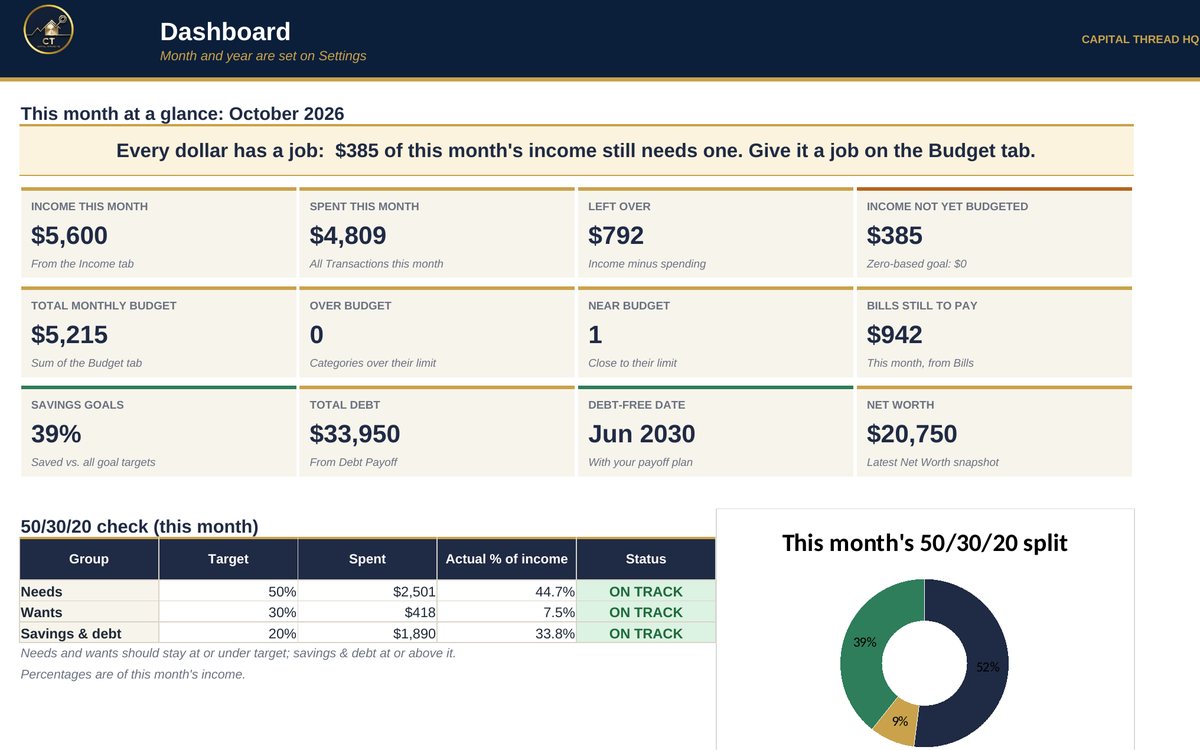
- Plans your monthly budget by category, tracks what you actually spend and flags any category that is near or over its limit.
- Adds paycheck-by-paycheck planning, a bill tracker with a due-date calendar, savings goals and sinking funds, a debt payoff planner and a net worth tracker.
- Shows your 50/30/20 split, a zero-based 'every dollar has a job' check and a full year of budget vs. actual.
Watch the walkthrough
Jay walks through every tab with example numbers, so you know exactly how to set it up.
What's inside
12 tabs, including a Start Here guide. Example rows show the format; type over them with your own numbers.
How to set it up
- Settings: pick the report year and the month to view. The 50/30/20 targets are pre-filled. Turn zero-based mode On or Off.
- Budget: list your categories, pick a group for each (Needs, Wants, Savings or Debt) and type the monthly budget.
- Income and Transactions: log money in and money out. Pick the category from the drop-down so spending lands on the right budget line.
- Paychecks: type this month's paychecks, then pick which paycheck (#1-#5) pays each category. Left to assign shows what is still free.
- Bills: list each bill once with its due day. Type Y in the month's box when it's paid. Autopay bills count as paid once the due date passes.
- Savings Goals: one row per goal. Name it exactly like a Budget category and every transfer you log in that category counts toward it.
- Debt Payoff and Net Worth: list your debts and pick Snowball or Avalanche. Update Net Worth every month or quarter.
- Dashboard and Year View fill in automatically. Change the month on Settings to look back at any month.
Questions
Does it work in Google Sheets?
Yes. It is built in Excel and opens in Google Sheets: upload the file to Google Drive and choose Open with Google Sheets. Excel (desktop or Microsoft 365) gives the smoothest experience. Apple Numbers is not supported.
Do I need to know formulas?
No. Blue text on a yellow cell is something you type. Everything else calculates for you, and the Start Here tab explains each step.
How do I get the file?
Buy it on Etsy and download it instantly from your Etsy purchases. Nothing is shipped.
Is this tax or legal advice?
No. Tax figures are planning estimates to help you set money aside. Check with a tax professional for your situation.
Something else? Message us on Etsy or tap Ask Jay at the bottom of the page.