 Capital Thread HQ
How many nights do you need to break even?
Short-Term Rental Host Profit Tracker
Track net income on every stay, occupancy by month and your break-even nights for Airbnb, VRBO or any platform.
Made for: Airbnb and VRBO hosts with one or a few properties.
What it does
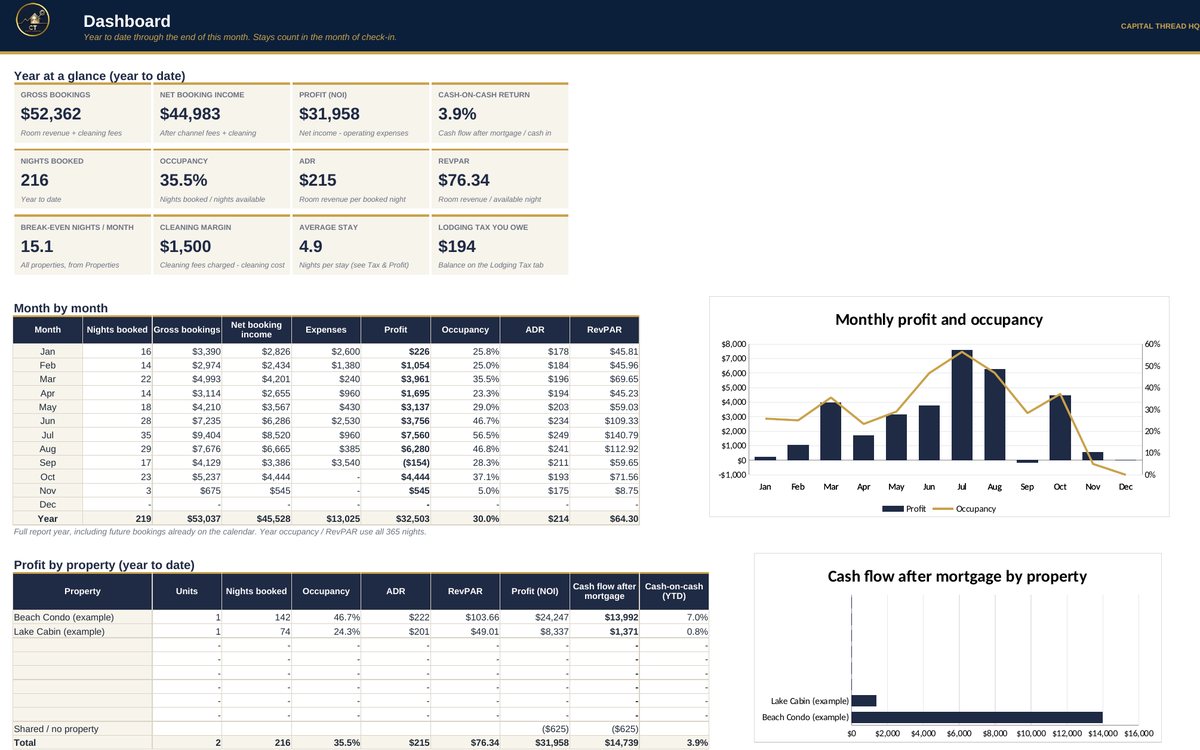
- Shows what every stay really nets after channel fees and cleaning, and your occupancy, ADR, RevPAR and break-even nights by month and by property.
- Tracks lodging / occupancy tax: what you collected, what Airbnb or VRBO already paid for you, and what you still owe.
- Builds a Schedule E-style P&L with mortgage interest, furnishing depreciation and mileage, and flags short average stays for your tax pro.
Watch the walkthrough
Jay walks through every tab with example numbers, so you know exactly how to set it up.
What's inside
11 tabs, including a Start Here guide. Example rows show the format; type over them with your own numbers.
How to set it up
- Settings: set the report year, check each channel's fee % and whether it pays lodging tax for you, and enter each property's tax rate.
- Properties: one row per listing with units, loan balance on Jan 1, rate, years left, monthly fixed costs and the cash you put in.
- Bookings: one row per stay. Pick the property and channel; nights, fees, net income and lodging tax calculate themselves.
- Expenses, Startup & Furnishing and Mileage: log costs, furniture and trips as they happen.
- Lodging Tax: type what you paid the tax office each month. Turnovers shows the next check-outs for your cleaners.
- Dashboard and Tax & Profit add everything up. Stays count in the month of check-in.
Questions
Does it work in Google Sheets?
Yes. It is built in Excel and opens in Google Sheets: upload the file to Google Drive and choose Open with Google Sheets. Excel (desktop or Microsoft 365) gives the smoothest experience. Apple Numbers is not supported.
Do I need to know formulas?
No. Blue text on a yellow cell is something you type. Everything else calculates for you, and the Start Here tab explains each step.
How do I get the file?
Buy it on Etsy and download it instantly from your Etsy purchases. Nothing is shipped.
Is this tax or legal advice?
No. Tax figures are planning estimates to help you set money aside. Check with a tax professional for your situation.
Something else? Message us on Etsy or tap Ask Jay at the bottom of the page.